 Via son blog officiel Google annonce la disponibilité de son application Google Places à destination des terminaux iOS.

Affichage des articles dont le libellé est Google. Afficher tous les articles
Affichage des articles dont le libellé est Google. Afficher tous les articles
jeudi 13 janvier 2011
Google Places débarque sur iPhone
Via son blog officiel Google annonce la disponibilité de son application Google Places à destination des terminaux iOS.
mardi 11 janvier 2011
Google : Pourquoi va t-on assister à une année record ?
Quoique l’on dise, l’année 2010 a été une superbe année pour Google, une des meilleures années sûrement. Malgré tout, beaucoup affirment que Google est en perte de vitesse, et aurait même perdu tout avantage concurrentiel. Pourtant, c’est tout l’inverse.

Insolite : l'appli Google Goggles résout vos grilles de Sudoku
L'application de recherche visuelle Google Goggles vient d'être mise à jour par la firme de Mountain View. Au programme, la prise en charge des codes-barres, la reconnaissance des produits dans les publicités et une autre fonction originale qui fait le buzz.
dimanche 2 janvier 2011
Top Google Apps in 2010

mardi 28 décembre 2010
Un NEXUS S géant !

Un NEXUS S géant a été installé par Google dans un magasin Best Buy de la petite ville de San Carlos au sud de San Francisco (Californie - USA).
dimanche 26 décembre 2010
Test du Google Nexus S sous Android
voici, le dernier né de Google. Le Google Nexus S est l’union entre le géant du moteur de recherche et Samsung. Un smartphone aux couleurs de Google qui se présente avec beaucoup d’avantages, mais aussi quelques défauts.

Google : 1,9 milliard de dollars dans un immeuble à New-York
Google a annoncé hier sur son blog officiel qu'il comptait investir 1,9 milliard de dollars dans un bâtiment new-yorkais. Le 111 Eighth Avenue est un ancien immeuble de l'autorité qui gère le port de New-York. Mais il est surtout situé sur une autoroute de fibre optique traversant la ville.

Le futur immeuble new-yorkais de Google (vu dans Google Earth).
samedi 25 décembre 2010
Insolite : Google Translate se met officiellement au Beatboxing
Google a répondu au buzz lancé il y a quelques semaines en proposant officiellement un bouton « beatbox » sur son service de traduction en ligne.
vendredi 17 décembre 2010
Body Browser : un Google Earth du corps humain ?
Google vient de lancer Body Browser, une application web permettant d'explorer le corps humain directement via son navigateur Web, à condition que ce dernier prenne en charge WebGL.
Google Maps 5.0 now available in the Android Market with 3D maps
One of the first apps I went to check out when I opened my Nexus S was the new Google Maps 5, but sadly it was not pre-installed on the device. Thankfully the update just hit the Android Market and now anyone can play with it (although some new features are limited to devices with Android 2.0+).
Surprisingly, the update to Maps version 5 is not showing up on my Nexus S, but I was able to download it on a T-Mobile G2. The 3D maps look awesome, but they still load kind of slow (even over WiFi) and you can see sections of buildings pop-up just like you could see map tiles load.


The new map caching is supposed to reduce the amount of data that is transferred by the app and I did notice a big speed improvement when just scrolling and zooming around the map. The transitions are much smoother when zooming in and I like that you can now rotate the view by twisting your fingers.
Overall it’s a pretty slick update, but I want to play with it some more. There is supposed to be offline navigation that I want to test and I also want to see how it performs on the Nexus S if I can get it to load.
Android 1.6+ devices can get Maps 5.0, but 3D and offline features require Android 2.0+, and some features may not be supported for all devices or countries.. If you try it out on your phone, be sure to let us know how it works.
Fully-supported devices:
The following devices support panning, zooming, tilting, and rotating gestures :
- Samsung Nexus S
- Samsung Galaxy S
- Motorola Droid
- Motorola Droid 2
- Motorola Droid X
- HTC Incredible
- HTC EVO 4G
- HTC G2
Partially-supported devices:
The following devices support panning, zooming, and tilting gestures only :
- HTC Desire
- Sony Ericsson X10
- LG Ally
- HTC Nexus One
Note: This list of devices may be incomplete and may change in the future as new Android phones are available for purchase.
Recently changed in this version:
- Tilting: Drag down with two fingers to tilt the map. Tilt while zoomed in on one of the 100+ cities around the world with 3D buildings to see a skyline spring to life.
- Rotating: Twist with two fingers to rotate the map. After tilting to see 3D buildings, rotate around them to gain a new perspective from any direction.
- Smooth zooming: Slide two fingers together or apart, and see the map and labels continuously scale to any zoom level, stopping when your fingers stop.
- Compass mode: Center the map on your location, and then tap the compass button in the top right corner. The map will flip into 3D mode and start rotating to match your perspective, while still keeping all the labels upright and readable.
Via androidandme.com
mercredi 15 décembre 2010
Google présente le site d’aide TeachParentsTech.org
La plupart d’entre nous qui utilisons naturellement internet, avons tous reçu des appels de détresse de nos parents, nous demandant comment effectuer des tâches basiques telles qu’un copier/coller, changer le papier-peint de l’ordinateur, etc. On n’a pas tous la patience de s’asseoir et de tout leur expliquer, et c’est pourquoi Google a sorti une façon cool pour aider nos parents – TeachParentsTech.org. Le site permet aux utilisateurs de sélectionner plus de 50 vidéos basiques how-to pour les envoyer à ceux qui en ont besoin. Regardez une vidéo de démonstration ci-dessous.


Via ubergizmo.com
Freebox V6 : Pas de Google TV, mais c’est une tuerie !
Comme prévu, Free a annoncé la Freebox V6 lors d’une grande messe ce matin. Les annonces sont… énormes ! Malheureusement, je dois vous le dire tout de suite, on s’y attendait, pas de Google TV. Il faut dire qu’il est bien trop tôt pour intégrer cette technologie, le code source de Google TV n’étant toujours pas disponible. Cependant, la puissance de la Freebox Player (l’ancienne Freebox TV) pourrait faire tourner Google TV sans problèmes.

Petit résumé des grosses annonces d’Iliad (maison mère de Free) :

Le forfait ne change pas de prix 29,99 euros/mois si vous êtes en dégroupage partiel, par contre en dégroupage total, il vous faudra ajouter 5,99 euros par mois supplémentaires.
L’offre a beaucoup évolué : les deux boitiers seront toujours proposés mais leur nom à changer : Freebox Server et Freebox Player, je reviendrai dessus juste après vous avoir parlé de l’offre.
Dans l’offre unique de Free, on a désormais : les appels vers les mobiles gratuits illimité (ça annonce que du bon pour Free Mobile), ainsi que les services déjà existants (catch-up TV, appels gratuits vers 108 destinations dans le monde, FreeWiFi, Internet jusqu’à 28 Mbit/s (ADSL) et 100 Mbit/s réel (Fibre Optique), services téléphoniques de messagerie vocale unifiée, fax, Ring Back Tone, 400 chaines TV dont 185 incluses dans le forfait, etc.).

La Freebox Server ou Freebox Révolution intègre désormais un NAS avec un disque dur de 250 Go, le WiFi 802.11n (450 Mbit/s), un switch avec 4 ports Gigabit Ethernet (1000 Base-T), une base DECT™ (Digital Enhanced Cordless Telephone) Cat-iQ, 3 ports USB 2.0, 1 port e-SATA, une entrée/sortie audio/stéréo, et deux hauts parleur pour diffuser de la musique.

Le disque dur est désormais intégré dans la partie modem (Freebox Server) pour faciliter le partage dans données au sein du foyer (façon NAS). En réalité la fonction NAS est une vraie fonction NAS avec le protocole UPnP pour partager des fichiers avec tout le monde (ordinateur, smartphone, TV, etc). Comme tout bon NAS qui se respectent, la Freebox Server possède une gestion et un monitoring à distance via une interface web.
Pour terminer (par le plus gros), la Freebox Player qui remplace notre bonne vieille Freebox TV est une tuerie. On retrouve en son sein un processeur Atom™ CE4100 cadencé à 1,2 Ghz capable de prouesses techniques et graphiques, avec une très bonne gestion de la 3D par exemple. Des fonctionnalités comme un décodage matériel pour la vidéo MPEG-4, la certification DivX Home Theater 3.0, un contrôleur flash NAND intégré, la prise en charge des mémoires DDR2 et DDR3 ainsi qu’une mémoire cache niveau 2 de 512 k. La puce SoC comporte un processeur d’affichage, un processeur graphique, un contrôleur d’affichage vidéo, un processeur de transport, un processeur de sécurité dédié ainsi que des interfaces d’E/S générales, etc.

La télécommande qui était une horreur en Freebox V5 a été revue en profondeur, elle intègre désormais un accéléromètre et un gyroscope à 3 axes. En communiquant par voie radio, elle n’a plus besoin d’être orientée vers la Freebox Player pour fonctionner.

L’interface TV de la Freebox Player est à la hauteur de nos attentes, ce n’est malheureusement pas du Google TV mais ça y ressemble partiellement, l’expérience TV a été revue en profondeur. On peut désormais prévisualiser les chaines en regardant un autre programme, on retrouve également du contenu (séries, films), les données multimédia présentes sur le NAAS (Freebox Server), Internet sur la TV grâce à un navigateur, et un lecteur Blu-ray (la grosse surprise), compatible HD (1080p), 3D et avec un son Dolby Digital Plus et DTS-HD 7.1.

Pour terminer, cette interface intègre un Freestore (market d’applications), où l’on retrouvera des applications diverses (news, météo, jeux 3D, etc). Free en a profité pour signer un partenariat avec Gameloft, il faudra donc s’attendre à du lourd en termes de performances graphiques. Si la télécommande ne vous plait pas, un gamepad sera disponible afin d’améliorer l’expérience gamer.
Notez que les deux box et la télécommande ont été designés par le célèbre designer Philippe Starck. Les gouts et les couleurs… vous savez. 

Bref, une révolution qui va bousculer les fournisseurs d’Internet français et faire baver nos voisins étrangers. Free a sorti du lourd, et même du très lourd.
Via frandroid.com
mardi 14 décembre 2010
On The Road With Cr-48: The Chrome Notebook Is Both Shiny And Tarnished
Every piece of technology has both good and bad attributes. Nothing is perfect. Not even the iPhone. (Well, at least not until that AT&T exclusivity ends.)
But until three days ago, I had never used a product with attributes that are both insanely awesome and shockingly awful at the same time. Welcome into the world, Cr-48.
But until three days ago, I had never used a product with attributes that are both insanely awesome and shockingly awful at the same time. Welcome into the world, Cr-48.
Now, Google has made it very clear that they don’t intend to release this product as it stands. As such, they’ve more or less asked those they’ve sent it to not to review it as a completed product. But it’s pretty much impossible to avoid talking about the hardware here because for most of us, it is the first and only gateway we’ve had into Chrome OS. Plus, there’s a lot of interest in this particular device among our readers, so I’m going to talk about it.

Now, Google has made it very clear that they don’t intend to release this product as it stands. As such, they’ve more or less asked those they’ve sent it to not to review it as a completed product. But it’s pretty much impossible to avoid talking about the hardware here because for most of us, it is the first and only gateway we’ve had into Chrome OS. Plus, there’s a lot of interest in this particular device among our readers, so I’m going to talk about it.
Simply put: the hardware is pretty bad. Actually, maybe not so much bad, as annoying as all hell. But the only reason it’s so annoying is because Chrome OS, even in its very early, fairly rough stage, is that good. Well, potentially that good.
While Jason wrote up his initial thoughts after a day with the device, I’ve been using it as my primary machine for just about three days now. Also, I likely have a different perspective as I’m currently traveling — something which a Chrome notebook should be perfect for.

The Design
Initially, when I took it out of the box, I sort of wanted to laugh at the Cr-48. Jason compared its look to that of one of the old 12-inch PowerBook G4s. But actually, I think it’s closer to a combination of an old 12-inch iBook and one of the previous generation MacBooks — the one that came in black. In fact, when you open it up and start typing on it, it feels very similar to that MacBook.
Of course, that MacBook is also a few years old already. And when compared to the new MacBook Air, this thing looks like a bloated dog. One covered in some kind of rubber blanket. The fact that it has a VGA port, an ugly side grill for the fan, and yet only one USB port, doesn’t help.
But again, this is a prototype device. So we have to cut Google some slack here. As far as I know, they haven’t said which of their manufacturing partners made this thing, but let’s hope it was the cheapest device possible for them to produce and that’s why it exists as it does.
I really do hope that’s the case.
The Setup
Okay, so I took it out of the box and laughed. But then I opened the lid. Immediately, the thing booted up. No need to press the power button. 15 seconds later, it was walking me through a very easy-to-understand tutorial on how to use Chrome OS. After a few minutes reading it, I was asked to take a picture of myself (for my profile picture) with the built-in camera (above the screen), then I was all ready to go. That’s it.
I signed in with my Google account, and the browser launched. My bookmarks, extensions, and web apps were all automatically synced. I was ready to go pretty much instantly.
Now I was impressed. Very impressed. This is absolutely the future of computer set-ups.
The Trackpad
But the love affair quickly turned sour when I started using the Cr-48 trackpad. Jason called it a “turd”, but I think that’s being too kind. It’s maybe the worst excuse for a piece of technology that anyone has created in the past five years. It’s so much worse than any other trackpad I’ve ever used in recent memory, it’s almost unbelievable. Those bug reports from a few weeks ago make sense now.
And it also makes sense why Google isn’t selling the Cr-48 at all, despite the high demand. If they sold this product with this trackpad, Google may not be allowed to ever attempt to make another branded product ever again. If you think I’m exaggerating, use one.
Every time I point at something and click down, the cursor moves below or above where I had originally pointed. I’ve now taught myself to aim slightly higher or lower than where I want to click. But I have to guess which it will be. It’s a crapshoot.
Trying to double click with two fingers is even worse. If you’re used to casually doing it with ease on a MacBook, this will be your hell. To get it to work, you essentially have to lift two fingers about a foot in the air, then bring them down in a perfectly straight line at a rapid speed while making sure that they both hit the pad at the exact same time. Okay, I may be exaggerating a bit there, but it’s really bad.
Two finger scrolling? It’s perfect if you like randomly jumping to various parts of webpages for no reason.
Okay, I’ve made my point. This trackpad is a disgrace. It’s an abomination. I don’t know if it’s hardware or software or both (likely), but it’s just terrible. I’m tempted to do the unthinkable: buy a mouse.

The Keyboard
Moving on. So, the trackpad quickly soured my Chrome OS experience. But after I figured out little tricks to better maneuver (mainly using the excellent keyboard and its shortcuts), I was back on track. After a day, I was frustrated. But after two days, I was really, really liking Chrome OS. And even certain things about the Cr-48 specifically.
For example, every computer should absolutely have a search button in place of caps lock. I can’t remember the last time I’ve used caps lock. And yet, there it is, right there in a vital place on the keyboard. On the Cr-48, I think the search button rivals the spacebar for my most-often-hit key. You click it and it launches a new tab reach to search away in the omnibox. It’s fantastic.
Also awesome are the window-switching and full screen mode buttons on the Cr-48. OS X, with Spaces, essentially allows you to do this type of window-switching, but I’d argue that it’s better on Chrome OS because everything is simplified. If you want to open a new window (as opposed to a new tab), it will reside on another screen. That said, it is a little tricky to navigate if you have more than two windows open — hitting the button will cycle through them in order.
Full screen mode has existed on Chrome for some time, but the keyboard shortcut makes it more accessible than ever before. And on smaller screens (like the 12-inch on on the Cr-48), it’s very nice.
The Speed
Speed is the other major weakness of the Cr-48. It’s running an Intel Atom chip which is apparently clocked at 1.66 GHz. That may seem like it would be fast enough to run a web browser, but it’s not. Well, not if you’re doing anything with Flash turned on.
When we initially reported on the Flash issues that Cr-48 users were having, many of our favorite commenters (who may or may not make a living developing for Flash) were quick with the typical “bias!” nonsense. Of course, a few hours later, none other than Adobe themselves admitted the performance of Flash on the Cr-48 was unacceptable, and said they were working on it.
Good, because beyond watching a small YouTube clip with no other tabs open, Flash is basically unusable on the Cr-48. And that’s annoying because Google has decided to bake Flash into not only Chrome, but Chrome OS as well. So extensions like Flash Block are your friend here — or go to about:plugins and disable Flash directly until Adobe gets the mess sorted out.
But even beyond Flash, the Cr-48 just feels very slow when compared to any other modern computer. Typing, for example, often lags on sites such as WordPress (which I’m using right now). And opening new tabs and windows takes a few seconds longer than it would on a normal machine.
All of this is would seem to be because Google included only 2 GB of RAM in the Cr-48. But I have a MacBook Air with only 2 GB of RAM and it flies. Google really needs to work with their OEM partners to get this lag sorted out before these Chrome notebooks start shipping. And I have to believe they will.

Beyond Prototype
In fact, in many ways, the Cr-48 reminds me a lot of the G1, the first Android phone Google shipped (with HTC) a couple years ago. They both were clearly step one of a platform that would quickly evolve. And the Cr-48 even sort of feels like the G1 to the touch.
I still have a G1. Looking at it now compared to the newer Android phones is pretty humorous. The platform has clearly come a long way. And that gives me a lot of hope for Chrome notebooks as well.
As it stands now, two things about this the Cr-48 currently standout: the boot-up time and the battery life. Both are excellent.
The Cr-48 goes from being off to the log-in screen in 15 seconds. That’s slightly above Google’s stated 10 second mark, but it’s still very, very good. When you log-in, it takes another 15 seconds or so to load all your profile information and Chrome preferences from the web. So you’re looking at a total time from zero to working in 30 seconds.
For comparison, the new MacBook Air, with its new solid state drives, goes from zero to working in about 18 seconds. But that’s without booting up Chrome (or your web browser of choice on OS X) and waiting for it to load a page. That adds another 5 seconds or so. So they’re very close in terms of startup speed between the two systems. And again, that’s on Google’s prototype machine.
But as I indicated above, the Air runs circles around the Cr-48 in just about everything else when it comes to performance.
The one area where the Cr-48 does seem to have the MacBook Air beat is battery life. Google claims 8 hours, but I think it actually may be more. Because I’m in Europe, I turned off the cellular antenna (since Verizon connectivity obviously won’t work here) and I’m seeing closer to 10 hours of battery life on a full charge when connected to WiFi. The MacBook Air has fantastic battery life as well, but Cr-48 is definitely better.
And again, just imagine what that will mean when someone actually creates a Chrome notebook that they intend to sell. The Cr-48 is a little bit bulky, but if they trim it down to around Air size, I bet they could still get at least a solid 7 or more hours out of the system. This seems to be one huge benefit of only running a browser.
Chrome OS
And let’s finally talk about that browser. Quite a few people were shocked when Chrome OS was revealed to be little more than Chrome — and that’s it. But that simplicity is the OS’s strength. It removes several layers of junk that most people these days never use on a computer.
I know that personally, roughly 95 percent of what I do on a computer these days is in the web browser. Of the other 5 percent, 4 percent of it could probably be done in the browser too (light image editing, taking notes, etc). The other one percent is more difficult but those are mainly things (iTunes media management, Photoshop) that I only need to do some of the time and can use a desktop machine for.
That’s the thing: Chrome OS isn’t going to fully replace anyone’s desktop anytime soon. But it could become a very viable on-the-go computing solution.
Even in its current beta state, Chrome OS has definitely been a perfectly adequate travel companion these past three days (Cr-48 trackpad aside). And it’s only going to get better. And if Chrome’s (the browser) evolution is any indication, it’s going to get better very quickly.

Panels
As Jason hit on quite a bit in his post, one of the most interesting things about Chrome OS will be how developers support it. Right now, most Chrome Web Store apps are little more than mildly glorified extensions, or just links to web apps already in existence. Meanwhile, one of the coolest features of Chrome OS, panels, are barely used. Developers can and should change this quickly.
Prettification
Another thing that bugs me about the OS currently is that Google seems determined to maintain some of Windows awful aesthetics. More directly: fonts look like shit.
Chrome on Mac easily looks much better than Chrome OS does for this very reason. Hopefully Google will add some polish here as Chrome OS pushes forward.
Also, the look and feel of the top toolbar (the area to the right of the tabs) is pretty poor. Google could and should do a much better job here.
And while we’re on the subject, Chrome’s already dicey themes all look even worse with Chrome OS. Google should just stick to some simple color options and leave out all the BS. No, I don’t want my Chrome OS to look like an ice cream cake any more than I wanted Windows to look like a hot dog stand. But that, of course, is just my opinion.
Connectivity
The biggest factor holding up Chrome OS is mostly out of Google’s control: WiFi infrastructure. While WiFi is fairly widespread, it’s far from everywhere. And Chrome OS is worthless without connectivity. I mean, it’s completely and utterly useless.
That’s exactly why Google teamed up with Verizon to offer back-up 3G connectivity. But beyond the paltry 100 MB they give you for free each month, that type of connection can get expensive quickly just to be able to simply use your computer.
Further, many deals will have to be worked out in various different countries for that level of connectivity. That’s why my Cr-48 isn’t fully travel-ready here in Europe, for example (there is no Verizon here).
So what happens when you boot up your Chrome notebook without a connection? Well, you get an error — a very confusing one. This has happened to me a few times in the past few days. I boot up the computer, enter my password, and it says there’s a problem with my password. Only that’s not true. It’s just that I’m not connected to the network, so it can’t verify my password (Google really needs to change the wording there).
The problem here is that if you’re on a network with a password, you have to log-in to Chrome OS as a guest, connect to the network and entire the password, then log out and log back in to your Google account. A pain. And something that a lot of users are going to experience again and again.

The Connected Computer
So while Google CEO Eric Schmidt says the world is now ready for Chrome OS, I think we’re still at least a year — and maybe a few years — away from this type of system being viable for most average consumers. But I think it’s fantastic that Google is willing to go out on a limb now to help the transition along.
Of course, the payoff for them looks be huge if they lead this new era of computing. And the risk is fairly minimal. Even if Chrome OS takes a while to take off, Google has more than enough capital to keep the project going for a long time — just like they did with Android at first.
In many ways, smartphones have and will continue to help us with this transition. The assumption of always having a connection to the web is now built into most of our daily lives. What good is a smartphone when you’re not connected? Maybe just for playing some games. Computers will eventually be the same way. Until games are fully online as well — something which the Chrome Web Store is trying to make happen.
I don’t think anyone disagrees that computers that are always connected to the Internet are the future, it’s just that Google is taking it to the extreme right now with these machines. It’s Internet or nothing. It’s bold.
Price
While Google hasn’t yet stated how much they (and their OEM partners) intend to sell Chrome notebooks for, that price is going to be crucial. It obviously needs to be low. Very low.
If Google wants these to compete with Windows machines, sub-$500 should do the trick. And if they can bring them in with better hardware than the Cr-48 for something like $300, I think they’re going to sell a ton of them next by next holiday season.
And Google keeps reiterating that they intend Chrome OS to work on other platforms as well. You can imagine desktop machines running Chrome OS might be perfect for schools and libraries. And Google could of course bundle Google Apps with them. Hell, I could even see them subsidizing Chrome notebook costs to get them available to all students in certain school districts that commit to Google Apps.
Actually, a big competitor for the Chrome notebooks may end up being the new MacBook Airs. Both are now trying to redefine just what exactly portable computing is. There’s no denying that the Air is a much, much sexier device both in look and feel than the Cr-48. But it’s also likely to be several hundred dollars — and maybe even a thousand dollars more expensive in some cases.
Again, that’s why Google needs to nail the price points and nail the execution with their OEM partners on these. I have some doubts as to whether that will happen or not initially, but even a mediocre Chrome notebook should put quite a bit of pressure on low-end Windows machines, at the very least. As I wrote a year ago, it would be the Microsoft squeeze.
Back Offline
To finish up this post, I actually moved back from the Cr-48 to my MacBook Air. One reason is that the typing lag was driving me insane. The other is that image insertion — and image management, is still pretty tricky with Chrome OS. So I’m back to a machine with more than just a browser.
This is actually the first time I’ve extensively used this machine in three days. It’s a little weird seeing the browser shrunk into a window. And I actually like it taking up the full screen more (that’s easy enough to do on a Mac or PC with Chrome, the browser). In a slightly weird twist, I actually don’t like seeing all the, yes, chrome. What’s the point?
Of course, I do cherish the speed of this Air versus the Cr-48. Oh and the trackpad. My god the trackpad. It actually works! It’s a thing of beauty that I will never take for granted again.
So there you go, I’m pretty divided right now on Google’s first take at the Chrome notebook. It’s both brilliant and bewildering. It’s both the future and a nightmare. But it’s definitely not boring, which is more than you can say for a lot of “new” technology these days. Watching it mature will be fun. But first the hardware needs to grow up.
If I could buy the Cr-48 right now, would I? No. But I’d download Chrome OS and install it on some cheap netbook. Or maybe even this Macbook Air…

jeudi 9 décembre 2010
Google Groups Tests a New Interface
Google Groups tests a new interface that seems to be inspired by Google Reader. There are a lot of great new features: keyboard shortcuts, infinite scrolling, search box autocomplete, a mobile version, integration with Google Profiles and a rich text editor for composing messages.
The new version of Google Groups hasn't replaced the old version because it's not finished and there are still many issues to solve. The right sidebar shows a lot of uninteresting information (announcements, recent searches), but doesn't list your groups. You need to click on "my groups" to see this list and you can also add some of the groups to your favorites. Another issue is that the new interface no longer has a summary view that shows a small snippet from the first message of a thread.
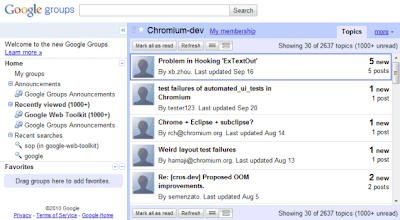
"When you sign in to Google Groups, you'll see a link to preview the new Google Groups. Once there, you can make it your default view (and you can switch back to the old version if you ever need it). We're excited about sharing these improvements with you, but this is just a start; we're working on improved spam controls, moderation, search, and other freatures to make Google Groups the best way to engage in discussions. We also want to hear your thoughts, ideas, and any issues you encounter, so please contribute to our Product Ideas page," suggests Google.
Talkatone Makes Free Google Voice/Gmail VoIP Calls on Your iPhone
iOS only: Gmail users can make free Google Voice calls, but why should they have all the fun? Talkatone sets up free VoIP calls, over 3G or Wi-Fi, from your iPhone, iPod, or iPad through Google Voice for free.
Talkatone does quite a few other neat things with your Gmail account and free voice-over-IP technology, but the main reason it's exciting is a feature that's somewhat tucked away. Double-tap on the Contacts header, and you'll get an option to make a Google Voice VoIP call. Choose a contact or dial a number, and you're calling. If it doesn't work on your first shot, you may need to do a little Gmail-to-Talkatone setup, described at the CyberNet News blog. Otherwise, it's a remarkably simple way to make a free Gmail phone call outside of Gmail.

Talkatone is a free download for iPhone, iPod touch (second generation and later), and iPad, and requires iOS 4.0 and later.
Via lifehacker.com
mercredi 8 décembre 2010
Chrome OS, Google's True Operating System
After today's Chrome event, it became clear that Chrome OS is Google's true operating system and Android is just a placeholder. Google says that web apps are the native apps in Chrome OS and there are a lot of cool applications in the Chrome Web Store, which is now available.
Chrome OS is still an early project and it's not yet ready for primetime, so the first Chrome OS notebooks will be available in mid 2011. For now, Google focuses on notebooks, but that will change in the future.
Google realized that cloud computing wasn't successful 15 years ago because there weren't great Web applications. Now there are a lot of great apps and Chrome Web Store is the place where you can find some of them. We'll see a lot of iPhone and Android developers creating web apps that work in Google Chrome, but also work in other browsers.

Check the New York Times web app, which has a beautiful interface, it's customizable and also works offline.
Chrome now has 120 million active users, up from 40 million users one year ago. This number will grow next year, when people will buy Chrome OS devices. Google hopes that Chrome OS will become one of the top 3 operating systems in terms of usage, but it won't be easy to achieve this. For some people, a Chrome OS notebook will be the main computer, for others it will be a secondary device. What's important is that users will have a great platform for running web apps, a computer that doesn't require maintenance, it's really secure and easy to use.
Chrome OS is "nothing but the web". It may seem limited, but it's actually open ended. It's a platform that lets you access the web instantly, that's always connected and always in sync, it's built for sharing with other people, it's up-to-date and it's constantly improving.

Chrome OS is the obvious extension to Chrome. Why use a bulky operating system that requires maintenance, it's slow and insecure when you can switch to a lightweight operating system that's fast, free and refreshing? If Chrome can open in 3 seconds, why can't the operating system load so fast? Chrome OS is an operating system that doesn't need drivers to print, doesn't need an antivirus to be secure and doesn't need to store or process your data. Chrome OS could make computers exciting once again and the best part is that you won't have to use it to benefit from its influence.
Inscription à :
Articles (Atom)